How to Set Up a Wireless Network Router
Are you tired of dealing with a slow and unreliable internet connection? Setting up a wireless network router can seem like a daunting task, but with this easy-to-follow guide, you'll be connected to the internet in no time. In this article, we'll walk you through the steps to set up a wireless network router, ensuring a strong and secure connection for all your devices.
Step 1: Unbox and Prepare Your Router
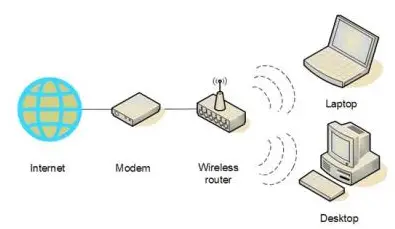
The first step in setting up a wireless network router is to unbox and prepare your router. Be sure to remove any protective packaging and connect the power cord to the router and the wall outlet. If your router has a built-in modem, you can skip the next step, but if it's a separate device, you'll need to connect it to the router using an Ethernet cable.
Step 2: Connect to the Internet
Next, you'll need to connect your router to the internet using a modem. If you have a separate modem, connect the Ethernet cable to the modem and then to the router's Ethernet port. If your router has a built-in modem, skip this step. Make sure to enter your internet service provider (ISP) details, including your account username and password, when prompted.
Step 3: Configure the Router's WiFi Settings
Now it's time to configure the router's WiFi settings. Log in to your router's web interface by typing its IP address in a web browser. The default IP address is usually 192.168.0.1 or 192.168.1.1. Once logged in, change the default admin password and set up your WiFi network name (SSID) and password. Make sure to choose a strong password to secure your network.
Step 4: Configure Advanced Settings
Once you've set up the basic WiFi settings, it's time to configure advanced settings. This includes setting up Quality of Service (QoS) settings, port forwarding, and setting up a guest network. Make sure to check your router's manual for specific instructions on how to configure these settings.
Step 5: Connect Devices to the Network
The final step is to connect your devices to the network. Make sure your devices are in range of the router's signal and that WPS is enabled on the router. If you're using wireless devices, you may need to configure the WiFi settings on each device. Also, make sure to configure any additional settings on your printer and camera devices.

Benefits of a Strong Wireless Network Router
Settting up a wireless network router can have numerous benefits for your home or office network. A strong and secure connection can improve your internet speeds, reduce buffering, and provide better overall performance. Additionally, a secure network prevents unauthorized access, protecting your sensitive information and data.
Conclusion
Setting up a wireless network router is a straightforward process that requires some basic knowledge of the router's settings and configuration. By following these steps, you'll be able to set up a strong and secure wireless network router, improving your internet experience and protecting your device from potential threats. Remember to always change the default admin password and set up a strong password to secure your network.
Common Issues and Troubleshooting
If you encounter any issues during the setup process, refer to your router's manual or contact your ISP. Some common issues include:
- Connected device not showing up on the network.
- Weak or no signal strength.
- Password not accepted.
- Router not broadcasting the network name.
Additional Tips and Resources
For further assistance, check the following resources:
- Routter manual.
- ISP's website.
- Online forums and communities.
- Router manufacturer's website.
Remember, a secure wired network router is essential for protecting your home or office network from potential threats. Follow these steps and take the necessary precautions to ensure a strong and secure connection.
-Connection-Step-1-Version-5.jpg/aid1756116-v4-728px-Set-up-a-Wireless-Network-(WiFi)-Connection-Step-1-Version-5.jpg "How to Set Up a Wireless Router: A Step-By-Step Guide - wikiHow")


/wireless-router-57ee8cea5f9b586c353f3e9f.jpg "How to Configure Router (Step-by-Step) - LazyAdmin")




![[Wireless Router] How do I enter my ASUS router's setting page using ...](https://i.stack.imgur.com/tbSKg.jpg "[Wireless Router] How do I enter my ASUS router's setting page using ...")
